
Camera Setup tools
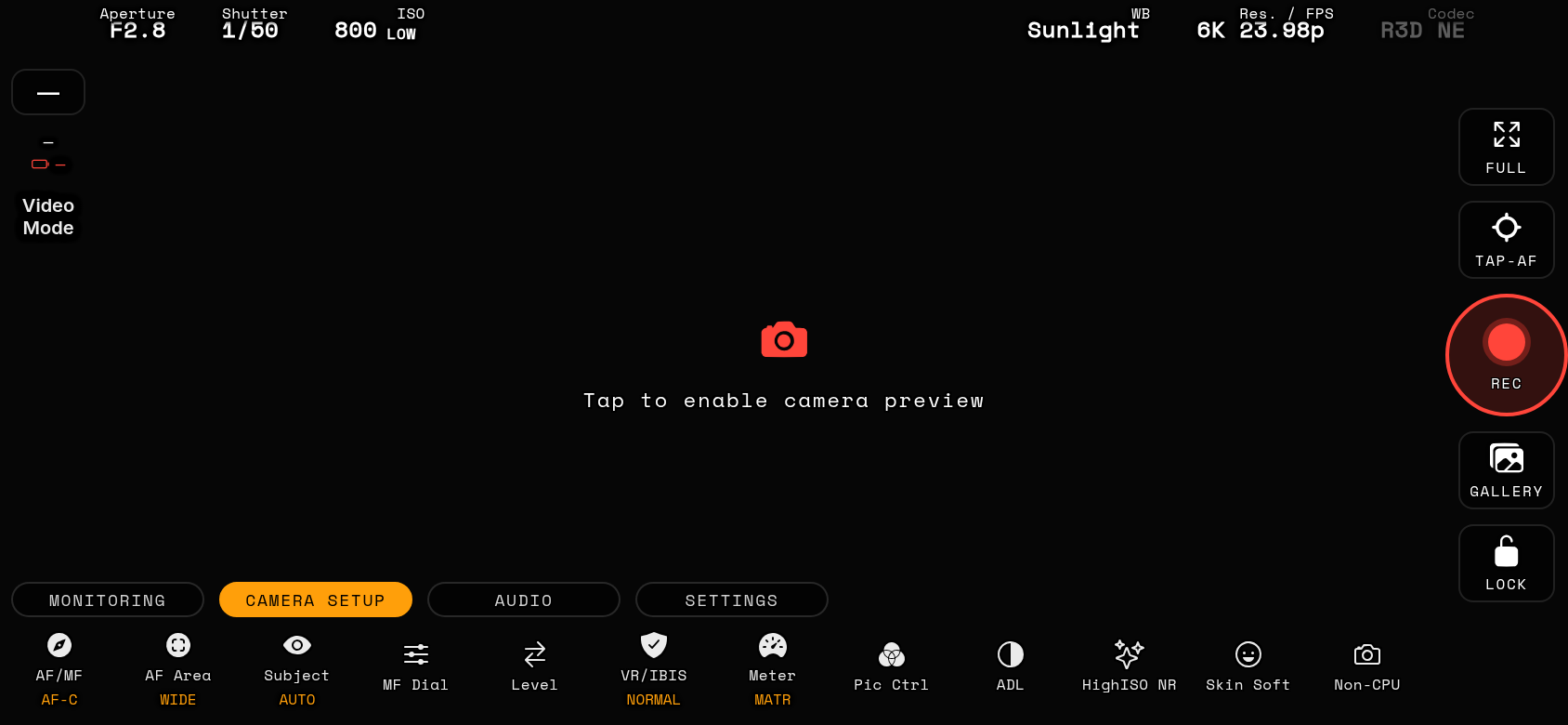
AF/MF
Autofocus / manual focus switch (AF-S, AF-C, MF).
AF Areaall bodies (Z5, Z6, Z7 and Z50 use the body's standard AF-area setting)
AF area mode — where the camera looks for focus (wide, single-point, tracking…).
SubjectZ8, Z9, Z6III, Zf, Z50II, Z5II, ZR
Subject detection — people, animals or vehicles priority for AF.
MF Dial
Manual-focus dial. Drive the lens focus motor remotely with a precision ruler slider (yellow reference line). Long-press the MF button to choose horizontal or vertical orientation — photo and video each remember their own. PULL ON opens the floating focus-pull panel (drag it anywhere): with the slider at your first mark, tap A to store it, refocus and tap B for the second mark — the pills show each point's position. The ◀/▶ buttons then run a smooth, eased focus transition to A or B over the selected time; tap the timer chip to cycle the duration (0.5 s → 5 s in half-second steps) and tap either button mid-run to stop. The elapsed time shows in the panel title while a pull runs.
PZ DialZ8, Z9, Z6III, Zf, Z50II, Z5II, Z30, Z50, Zfc, ZR — with a Nikon power-zoom lens attached
Power Zoom dial (PZ). A spring-back rocker that drives a power-zoom lens: push toward W (wide) or T (tele) and release to stop — in Auto the drive speed follows how far you push. Long-press the PZ button to pin a fixed drive speed (−5…+5, same scale as the body menu) or to switch the slider between horizontal and vertical. With a speed pinned you also get W/T direction plus Start / Pause / Stop transport buttons for hands-off automatic zooms at constant speed. A / B pills store and recall exact zoom positions (PZ3 lenses): tap an empty pill to STORE the lens's current zoom position, tap it again to RECALL — the lens drives itself to that spot — and long-press to clear. The recall drive runs at the pinned speed when one is set; in Auto (no pinned speed) it uses the body-menu default (0). Positions are stored per lens, so a preset saved with one lens won't drive another. The live focal length shows next to the readout. Greyed out when the attached lens has no power zoom.
VR/IBIS
In-body stabilisation (VR/IBIS) on/off and mode.
Meter
Exposure metering pattern (matrix, center-weighted, spot, highlight).
Pic Ctrl
Picture Control — the camera's colour/tone preset (incl. flat/N-Log looks). The picker lists the camera's own controls and your Custom slots with their body names; a control that was adjusted on the camera is marked with an asterisk (Standard*) and its changes are listed under it, on the button badge too. The footer opens the Picture Control editor.
ADL
Active D-Lighting — in-camera highlight/shadow protection.
HighISO NR
High-ISO noise reduction strength.
Skin SoftZ8, Z9, Z6III, Zf, Z50II, Z5II, ZR
Skin softening amount for interview/beauty work.
Non-CPUall bodies except Z50
Non-CPU lens data — register manual lenses so IBIS and EXIF work correctly. Tap a slot to make it the active lens. LONG-PRESS any slot to edit it or to fill a free one: lens name (up to 36 characters), focal length (0.1 mm steps below 100 mm) and maximum aperture (F0.01 steps below f/10) are written straight into the camera's Non-CPU lens data — the lens you are shooting with stays selected, and the picker labels update as soon as the body confirms. CLEAR SLOT empties a slot again.
Level
Virtual horizon / level. Shows camera pitch and roll with smooth motion for perfectly level shots. Long-press for roll/pitch numbers and angle-ladder labels.
HF FlickerZ8, Z9, Z6III, Z50II, Z5II, ZR
High-Frequency Flicker Reduction (Nikon HF flicker) on/off — the body's own setting for the current mode (photo or video). Hidden by default: enable it in Settings → tools. While it is On and the exposure program allows it (M or S in photo, M in video, shutter 1/30–1/8000), the shutter chip and Body Control tile show Nikon's fine-tune format — only the denominator with one decimal, e.g. 512.0 instead of 1/500 — and the Shutter sheet gains ◄ faster / ► slower rows that step the fine-tune one dial click at a time. Available on Z-series bodies that support it; on other cameras the button reads not available.